JoulesCloud
JoulesCloud · Core facility operations

Run your shared instruments like one calibrated system.

JoulesCloud puts scheduling, user training, maintenance, incidents and consumables on a single timeline — so every reservation on a confocal, cytometer or sequencer is backed by a trained user, a working instrument and stocked reagents.

Confocal Microscopy Flow Cytometry Genomics Proteomics Bioimaging Cell Sorting
Who it's for

One platform, three jobs it makes easier.

A shared-instrument facility has three kinds of people around it. JoulesCloud gives each of them the part they need — working on the same data.

Facility manager

Run the facility, not a spreadsheet

See utilisation, apply your access policy, and keep an audit trail you can hand to a grant reviewer or an accreditation body.

  • Instrument status, open incidents and overdue maintenance on one dashboard
  • Training and access rules configured once, then applied automatically
  • Full history of every booking, training decision and stock movement
Technician / staff scientist

Approve, triage, keep things running

The day-to-day of a core facility in one queue instead of scattered emails.

  • Approve or reject supervised training sessions with notes
  • Pick up reported incidents and trigger instrument status changes
  • Log maintenance and watch consumable stock and expiry dates
Researcher / PI

Book in seconds, know where you stand

Self-service that already respects the rules, so there is nothing to ask permission for.

  • Book any instrument you're cleared for, within your level's hours
  • See your progress toward independent and advanced use
  • Answer the pre-session form and report problems in two clicks
How a facility actually runs

One loop, from first request to restock.

Most tools only cover the calendar. JoulesCloud models the whole operating cycle of a shared-resource lab, so nothing downstream of a booking is left to spreadsheets and email.

01

Request access

Researchers request an instrument; managers grant a starting proficiency level.

02

Train

Supervised sessions with a technician count toward Independent, then Advanced.

03

Reserve

Book on the timeline within the rules and working hours for your level.

04

Run the session

Answer the pre-session form, use the instrument, record what happened.

05

Log & report

Raise incidents, trigger status changes, feed usage into dashboards.

06

Restock

Consumable use draws down stock; low-stock and expiry alerts close the loop.

Six modules, one database

Everything a core facility manager keeps in their head — made operational.

Each module works on its own and shares one model of instruments, people and time. Bookings link directly to incidents, forms and training records.

MODULE 01

Booking & Calendar

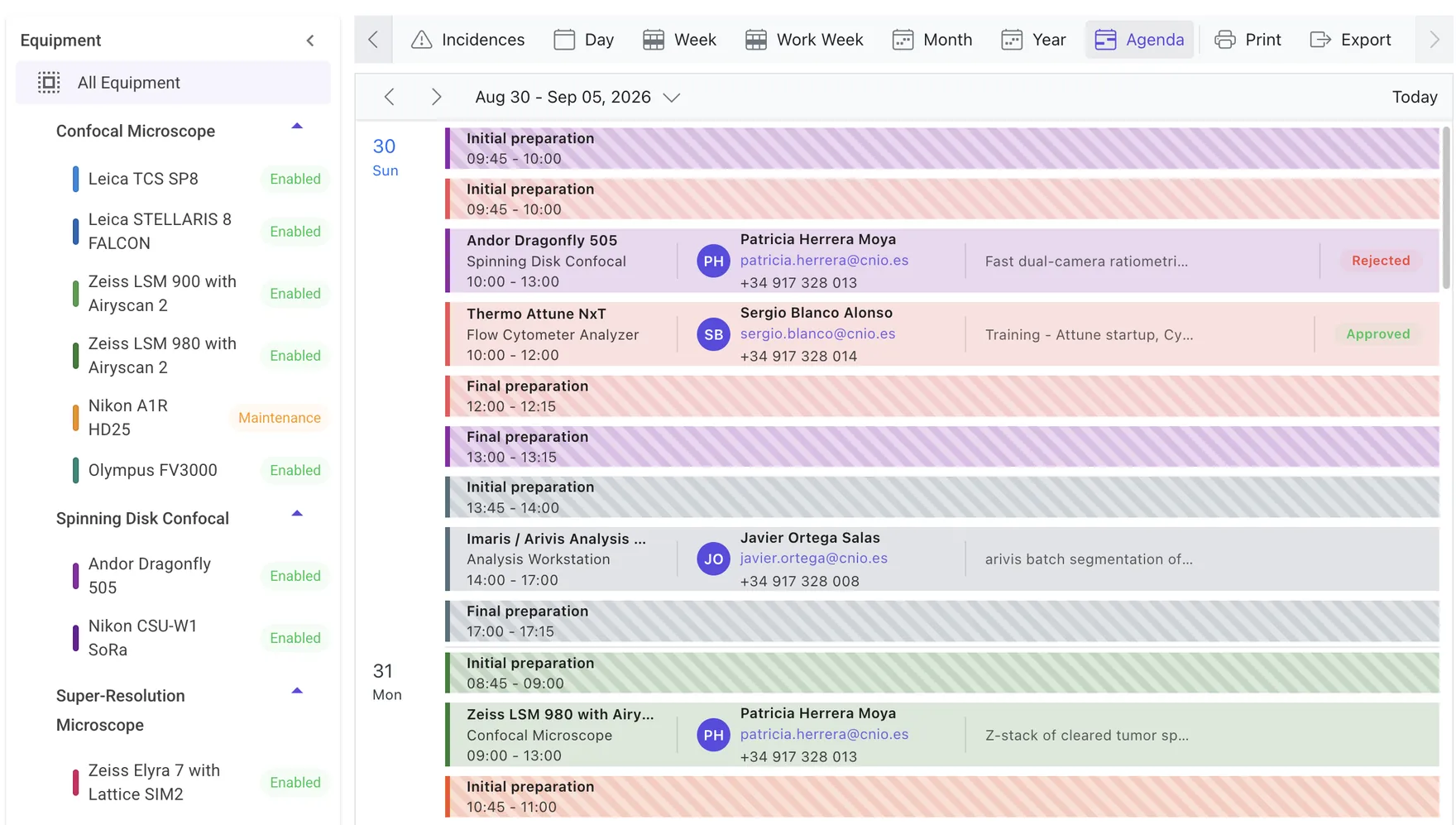
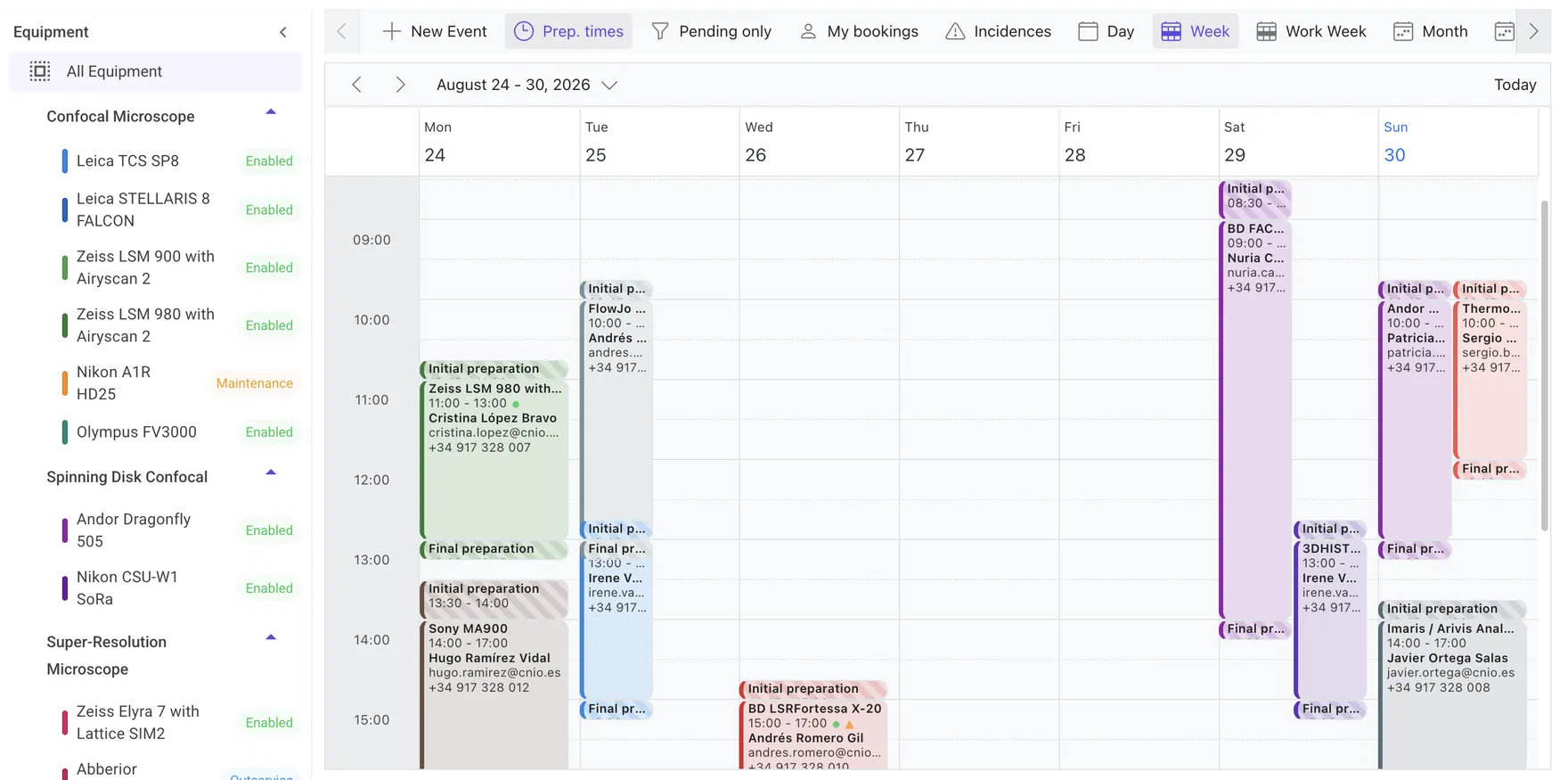
A drag-to-reserve week/day scheduler with one lane per instrument, grouped by type and colour-coded.

  • Per-instrument working hours by proficiency level
  • Facility-wide non-working days & holidays
  • Reservation, cancellation & modification detail dialogs
MODULE 02

Training & Proficiency

Every user has a level per instrument: Novice → Independent → Advanced, earned through approved supervised sessions.

  • Configurable session thresholds per instrument
  • Technician approve / reject with notes & time slots
  • Full profile history of every level change
MODULE 03

Equipment & Maintenance

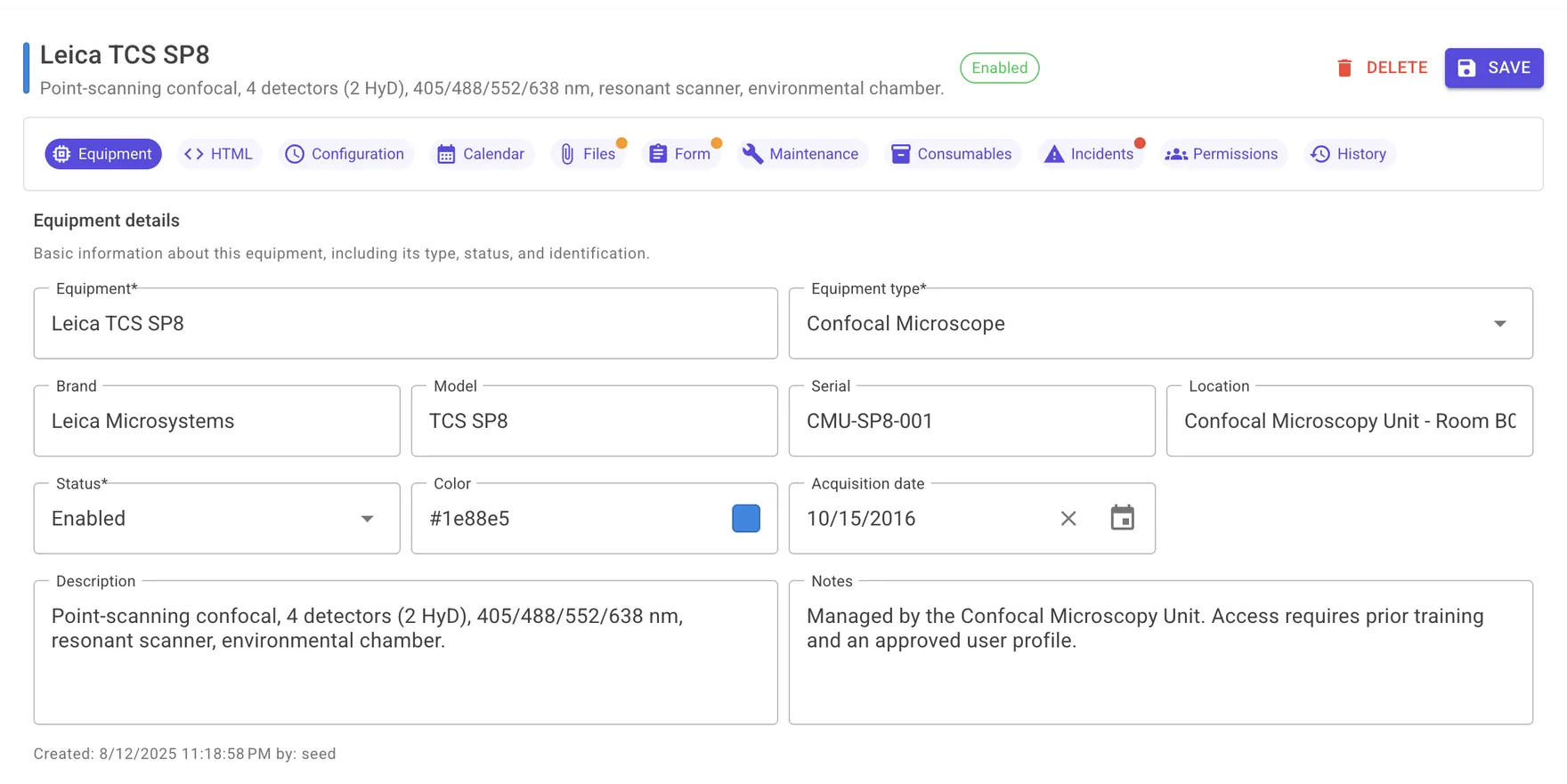
A record per instrument — brand, model, serial, location, rich documentation, images and files.

  • Status workflow: Enabled, Maintenance, Out of service, Disabled
  • Status history with reasons; technician assignment
  • Maintenance log with cost, hours & next-due scheduling
MODULE 04

Incidents

Anyone can report a problem from a booking or their progress page; technicians triage and resolve.

  • Severity Low / Medium / High / Critical
  • Assign technician, resolution notes, audit timestamps
  • Incidents can drive instrument status changes
MODULE 05

Consumables Inventory

Track reagents and parts with current / minimum stock, unit cost, supplier and location.

  • Lot numbers & expiration dates per movement
  • Stock in / out / adjustment history & bulk usage
  • Low-stock and expiry alerts; link consumables to instruments
MODULE 06

Dashboard & Reports

A live operations view: KPIs, instrument-status mix, researcher proficiency and incident load.

  • Open incidents & overdue maintenance at a glance
  • Charts toggle to plain lists for quick scanning
  • Upcoming maintenance and recent incident feeds
A look at the product

Not a mock-up. This is the real interface.

Server-rendered, fast, and light or dark to match your system — these are screenshots from a running instance.

Reservation rules engine

The calendar enforces your policy — you don't have to.

Each instrument carries its own configuration. The scheduler blocks bookings that break the rules before they are ever created, and reserves preparation windows automatically.

DURATIONMinimum & maximum reservation length, in configurable steps.
BUFFERSInitial & final preparation time held around every session.
LEAD TIMECancellation & modification cut-offs before start.
QUOTAMaximum reservations per day per user.
HOURSWorking days & hours that differ by proficiency level.
Proficiency-gated access

Only trained hands on the instrument.

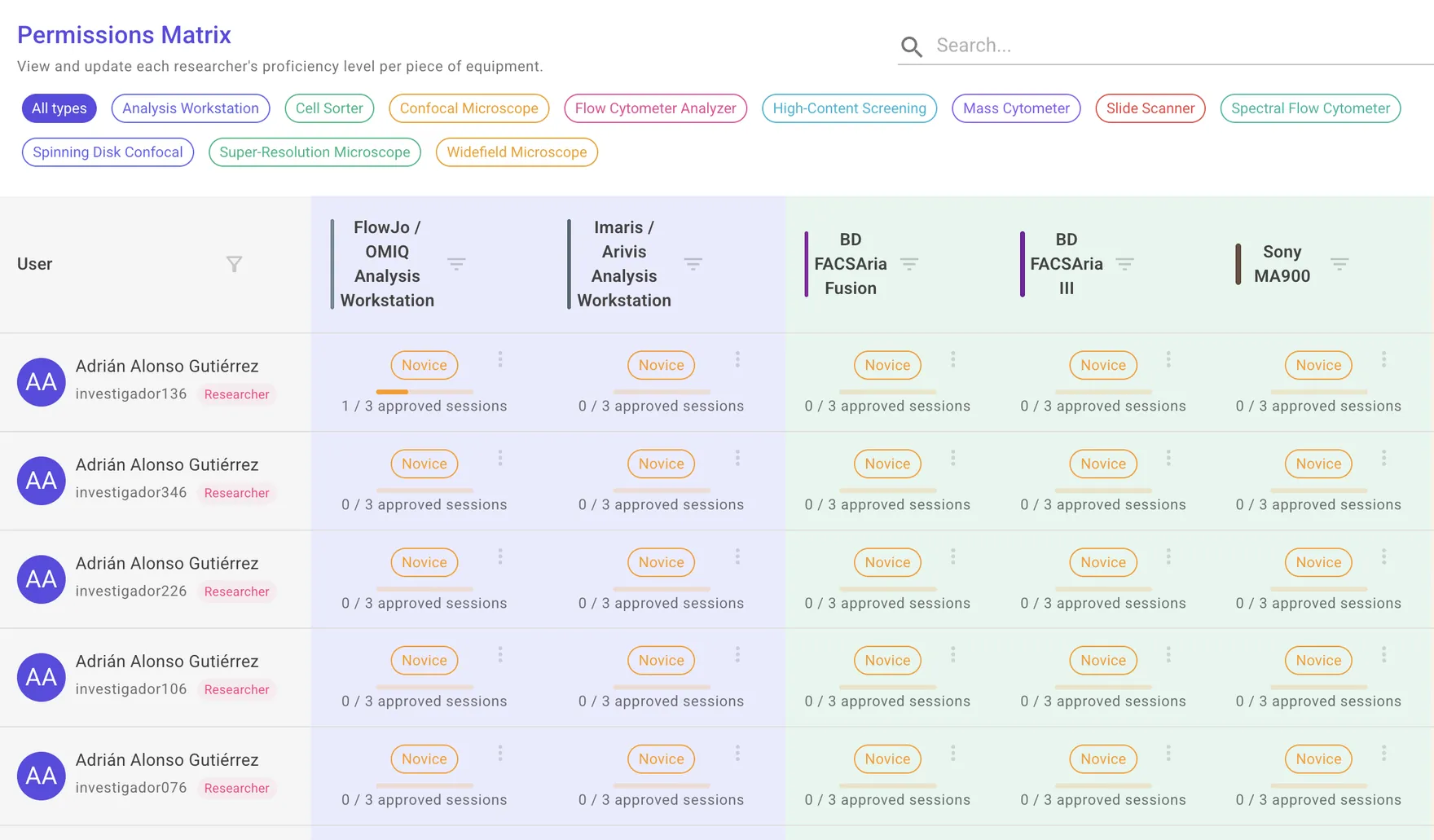
Access is not a yes/no flag. Each researcher progresses through levels per instrument, and the permissions matrix gives managers one screen to see and adjust where everyone stands.

NOVICEBooks only supervised slots; a technician must be present.
INDEPENDENTBooks solo within level hours after enough approved sessions.
ADVANCEDFull access, extended hours, can mentor others.
settings / permissions matrix
ResearcherLSM 980AuroraAriaNovaSeq
A. FerrerADVINDNOV—
M. NdiayeINDADV—NOV
R. OkaforNOVINDIND—
L. Ventura—NOV—ADV
NOVICE → IND
2/3
IND → ADVANCED
6/8
Pre-session forms & reagent tracking

Capture the context of every run — and what it consumed.

Attach a questionnaire to an instrument or a whole instrument type. Ten answer types, required fields, conditional questions that appear based on earlier answers, and file uploads. When a supervised session closes, the consumables it used are logged against stock.

QUESTIONSShort / long text, number, date, date-time, yes-no, dropdown, single & multi choice, file upload.
LOGICQuestions depend on the answer to another question.
CONSUMABLESSession usage draws down stock with lot & expiry recorded.
Operations at a glance

The morning view for whoever runs the facility.

Open the dashboard and see whether today is going to be a good day: what's broken, what's overdue, who's active and where incidents are piling up.

Ready to see it with your instruments?

A 30-minute walkthrough set up with your own instrument types, access rules and reagents.

Request a demo
Deployment & security

Runs as SaaS — or entirely on your own servers.

Choose the hosting model that fits your institute's data policy. The application is the same either way; only where it runs changes.

HOSTING

SaaS or self-hosted

Managed by us on EU infrastructure, or installed on your own servers — your data never leaves the building.

SECURITY

Role-based access

Administrator, Technician and Researcher roles. Every screen and action is gated by role.

REAL-TIME

In-app notifications

Users are notified about session decisions, incidents and approvals, with an unread badge and a notification centre.

TRACEABILITY

Audit & history

User audit log, instrument status history, and a full history of every proficiency change and stock movement.

ACCESSIBILITY

Dark mode & contrast

A built-in light/dark theme and a high-contrast toggle, remembered per user.

STACK

Standard web stack

A server-rendered .NET application on SQL Server. Nothing exotic for your IT team to maintain.

Questions

The things facility managers ask first.

How is it deployed?
Two options: a managed subscription on EU infrastructure, or an on-premise licence installed on your institute's own servers. The application is identical — only where it runs changes.
Who owns the data?
You do. Self-hosted, it never leaves your servers. On the managed plan it stays on EU data centres and can be exported at any time in standard formats.
Can we migrate from PPMS, iLab or a spreadsheet?
Yes. Onboarding includes importing your instruments, instrument types, users and existing bookings from an export or a spreadsheet.
How does login work? Do you support SSO?
Accounts are role-based (Administrator, Technician, Researcher). For self-hosted deployments we can look at connecting to your institute's identity provider — tell us which one you use.
What does it cost?
Pricing is per instrument and depends on the deployment model. Tell us how many instruments and users you have and we'll send a quote.
How long until we're live?
A pilot with a handful of instruments can be running within days. A full rollout depends mostly on how many training and reservation rules you want to configure.
Is support included?
Email support is included. Response-time commitments are available on the managed plan.
Get in touch

See it running with your instruments.

Tell us a little about your facility and we'll set up a walkthrough with your own scenario — your instrument types, your access rules, your reagents.

By sending this form you agree that JoulesCloud will use these details only to reply to your request. See our Privacy Policy.